Scheduled Task Frontend Development API
Common Module Extensions
Provider
dec.provider.schedule
Register a New Step
Method
registerTaskStep(config[, index])
Parameters
config: Object, required. Step object. Containstext(display text),value(identifier), andcardType(shortcut of the component for this step).index: Number, optional. Insertion position. This is the start index for aspliceoperation on the array. If omitted, the step is appended at the end.
Example
// Add a step to the step bar
// First argument: step object
// Second argument: insertion position
BI.config("dec.provider.schedule", function (provider) {
    provider.registerTaskStep({
        text: BI.i18nText("New Step"),
        value: "plugin_step",
        cardType: "dec.schedule.task.plugin"
    }, 1);
});
Page implementation example:
// New step implementation
!(function () {
    var Plugin = BI.inherit(BI.Widget, {

        props: {
            baseCls: ""
        },

        render: function () {
            return {
                type: "bi.label",
                text: "New Step"
            };
        },

        /**
         * Validation function, optional.
         * Executed when clicking Next or when saving is allowed; invokes callback with the validation result.
         * @param callback
         */
        validation: function (callback) {
            callback(true);
        },

        /**
         * Value getter, required.
         * The returned value is merged with the current task value this.model.currTask via BI.extend.
         * @returns {{}}
         */
        getValue: function () {
            return {};
        }
    });
    BI.shortcut("dec.schedule.task.plugin", Plugin);
})();
As shown above, there is a global model for the task creation process that stores all currently configured values. Use this.model.currTask to get and modify the value of the task being edited.
Result
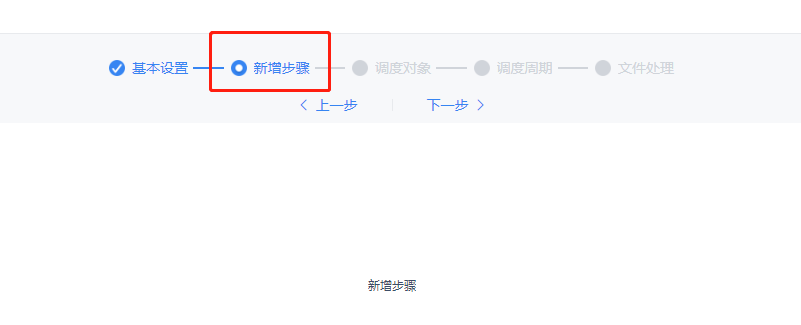
Register a New Dispatcher Type
Method
registerDispatcher(dispatcher[, handings])
Parameters
dispatcher: Object, required. Dispatcher object type. Containstext(display text),value(identifier), andcardType(shortcut of the component for this dispatcher type).handings: Array, optional. Handling methods for the new dispatcher type. For the definition format, see "Register a New File Handling Method" below. If omitted, no handling methods are registered by default; they can be added later viaregisterHandingWay.
Example
// Register a new dispatcher object type
// First argument: new dispatcher object
// Second argument: handling methods for the new dispatcher type
BI.config("dec.provider.schedule", function (provider) {
    provider.registerDispatcher({
        value: "plugin",
        text: "New Type",
        cardType: "dec.schedule.task.dispatcher.plugin"
    }, []);
});
The page implementation is the same as for adding a new step — implement the required getValue function and the optional validation function.
Result

Register a New File Handling Method
Method
registerHandingWay(config, scopes)
Parameters
config: Object, required. Handling method. Containstext(display text),value(the actionName synchronized with the backend), andcardType(shortcut of the component for this handling method). The optionalactionsproperty can be used when only one handling method is displayed but multiple actions are involved (see Client Notification for reference). To make a handling method non-cancellable (similar to scheduled computation), set the optionalselectedandforceSelectedproperties totrue.scopes: Array, required. Scope of the handling method. This parameter must be set, otherwise the method will not be registered to any dispatcher type. Valid values are the three built-in types (shown in the example) as well as plugin-registered dispatcher types (thevalueof thedispatcherparameter inregisterDispatcher).
Example
// Register a new handling method
// First argument: new handling method object
// Second argument: scope array; valid values are the three built-in types plus plugin dispatcher types
BI.config("dec.provider.schedule", function (provider) {
    provider.registerHandingWay({
        text: "New Handling Method",
        value: "com.fr.xxxx", // actionName of the plugin
        cardType: "dec.schedule.task.file.handling.plugin",
        actions: [] // one handling method with multiple actions
    }, [DecCst.Schedule.TaskType.DEFAULT, DecCst.Schedule.TaskType.REPORT, DecCst.Schedule.TaskType.BI]);
});
Note: Do not register
runType. There is currently compatibility handling forrunType, but support for it will be gradually removed in future versions.
Page implementation example:
// Handling method implementation
!(function () {
    var Plugin = BI.inherit(BI.Widget, {

        props: {
            baseCls: ""
        },

        render: function () {
            return {
                type: "bi.label",
                text: "New Type"
            };
        },

        /**
         * Validation function, optional.
         * Returns whether the current handling method passes validation.
         * @returns {boolean}
         */
        validation: function () {
            return true;
        },

        /**
         * Value getter, required.
         * The returned value is placed in outputActionList.
         * @returns {{}}
         */
        getValue: function () {
            return {};
        }
    });
    BI.shortcut("dec.schedule.task.file.handling.plugin", Plugin);
})();
Register a New Attachment Archive Method
Method
registerTaskAttached(config, scopes)
Parameters
config: Object, required. Archive method. Containstext(display text) andvalue(value exchanged with the backend).scopes: Array, required. Scope of the archive method. This parameter must be set, otherwise the method will not be registered to any dispatcher type. Valid values are the two built-in types (shown in the example) plus plugin-registered dispatcher types.
Example
// Register a new attachment archive method
// First argument: new archive method object
// Second argument: scope array
BI.config("dec.provider.schedule", function (provider) {
    provider.registerTaskAttached({
        value: 11,
        text: "pluginText"
    }, [DecCst.Schedule.TaskType.REPORT, DecCst.Schedule.TaskType.BI]);
});
Changelog
- 2019.10.10: Implemented plugin registration using provider
- 2019.11.12: Added attachment archive method registration